



Customer relationship management (CRM) software is designed to help businesses capture leads, communicate with customers and grow revenue. While some CRM platforms offer comprehensive solutions for team collaboration across all business departments, others focus on a specific area, like sales or marketing. Choosing the best CRM software for your company means finding a product that matches your business’s needs.
Pipedrive and Salesforce are top CRMs with very different audiences and feature sets. We’ve researched details from our comprehensive Pipedrive review and Salesforce review to help businesses compare these platforms and determine which is best for their growth.
Pipedrive vs. Salesforce Comparison
Price and Plans
Pipedrive
Pipedrive has five reasonably priced plans that include essential tools to boost sales. Most plans include Pipedrive’s best features, although some are limited. We love that the slight price difference between plans means you can scale with Pipedrive as your business grows. Plus, you can save up to 32 percent when paying annually.
We like that all plans have unlimited seats, contacts and sales pipelines and that you can try any plan with a 14-day free trial. We also appreciate that Pipedrive offers cost-effective add-ons, like Lead Booster and Campaigns, to expand your CRM capabilities affordably. However, we would have preferred to see less-restrictive automation limits.
|
Plan |
Price (per user per month) |
Included features |
|---|---|---|
|
Essential |
$21.90 (billed monthly) $14.90 (billed annually) |
|
|
Advanced |
$37.90 (billed monthly) $27.90 (billed annually) |
Everything in Essential, plus the following:
|
|
Professional |
$59.90 (billed monthly) $49.90 (billed annually) |
Everything in Advanced, plus the following:
|
|
Power |
$74.90 (billed monthly) $64.90 (billed annually) |
Everything in Professional, plus the following:
|
|
Enterprise |
$119 (billed monthly) $99 (billed annually) |
Everything in Power, plus the following:
|
Salesforce
Salesforce offers four plans in its Sales Cloud CRM packages. In general, we found Salesforce to be on the expensive side. We appreciate the 30-day free trial for all plans but were disappointed that most features that make the platform so potent require a premium plan or add-ons.
The entry-level plan includes essential sales features such as lead management tools. However, the 10-seat limit means you must upgrade to a significantly more expensive plan as your business grows. The expansive tools in Salesforce’s premium plans are excellent for large businesses and enterprises. Still, the limited features and relatively high costs of lower-tier plans, as well as the required annual commitment, could be barriers for many small businesses.
|
Plan |
Price (per user per month, billed annually) |
Included features |
|---|---|---|
|
Starter |
$25 (10-seat user limit) |
|
|
Sales Professional |
$80 |
Everything in Starter, plus the following:
|
|
Sales Enterprise |
$165 |
Everything in Sales Professional, plus the following:
|
|
Sales Unlimited |
$330 |
Everything in Sales Enterprise, plus the following:
|
Pipedrive
Pipedrive is our choice for an affordable CRM. We like that its plans are reasonably priced and include essential features so you can find a solution that fits your organization. As your business grows, you can upgrade or purchase add-ons without the painful price jump of Salesforce’s options. However, large businesses with complex needs might find Pipedrive’s features limiting and see better value in Salesforce’s comprehensive software.
Artificial Intelligence
Pipedrive
We love that Pipedrive’s Sales Assistant, powered by AI and preprogrammed algorithms, is available with all plans. Using your sales data, the Sales Assistant can do the following:
- Provide insights and advice to optimize your workflows and drive sales
- Tell you which CRM metrics you should track
- Determine which leads to engage
- Advise on which activities to prioritize
- Send timely notifications and visual performance graphs
However, while the Sales Assistant can help your employees convert leads more efficiently, we would have liked to see Pipedrive’s AI functions extend to communications.
Salesforce
Salesforce offers multiple AI-powered tools, but Einstein GPT and Einstein Conversation Insights stand out.
- Einstein GPT: Einstein GPT can respond to customers via email or chat and summarize communications between contacts and your team. It can study your sales and customers to provide recommendations, like telling you the right time to reach out to close the deal. It can also study your teams and offer tips and automation suggestions to improve efficiency.
- Einstein Conversation Insights: Einstein Conversation Insights can record and analyze customer interactions and provide key insights in a searchable and shareable transcript. It can also track your business mentions across the internet and create visual trend reports so you can see where and how people are talking about your business.
Salesforce’s AI capabilities are state-of-the-art. However, we were disappointed that most functions are restricted to premium plans. In fact, the only standard feature is Einstein Activity Capture, which syncs data from your email and calendar accounts.
Salesforce
Salesforce’s powerful AI tools far outpace Pipedrive’s. Pipedrive’s AI assistant provides helpful tips, CRM analytics and recommendations, but Salesforce’s Einstein is a more robust machine-learning tool. It offers insights and helps you communicate effectively with contacts to stay on top of the best leads and close more deals quickly.
Sales Features
Pipedrive
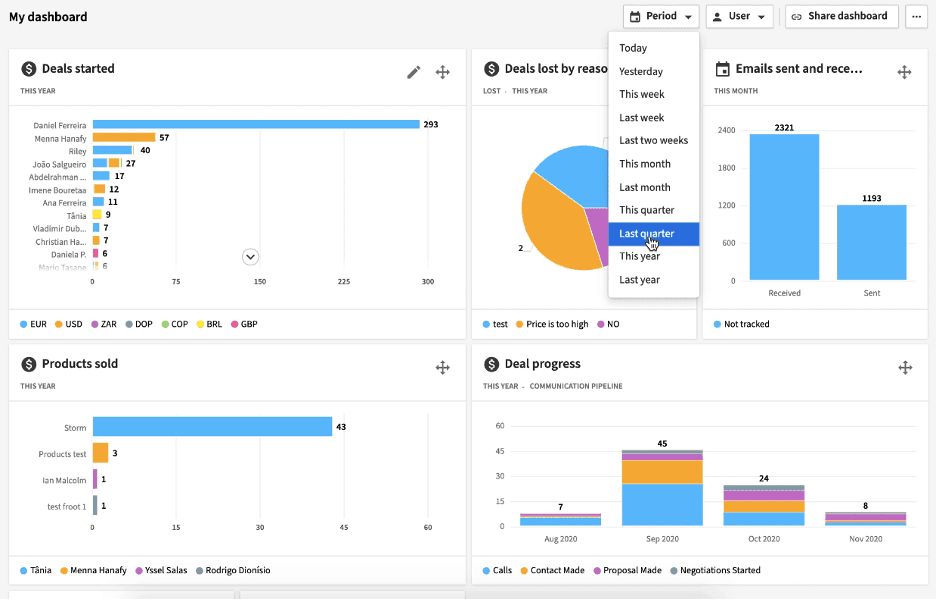
Lead generation is a breeze thanks to Pipedrive’s visual pipeline and robust sales features. We like that all plans include most tools but with varying limits, so you get access to everything you need but only pay for the functionality that’s appropriate for your business size.
- Visual sales pipeline: You get unlimited customizable pipelines, templates and helpful visual reports with all plans. We love the color-coded Kanban pipeline that shows the status of every deal at a glance.
- Deal rotting: The deal rotting feature, which highlights inactive deals in red so your team can take action, is especially useful.
- Filters: Filters make the platform even better for managing deals and monitoring employees.
- Add-ons: We appreciate that you can take your sales capabilities even further with cost-effective premium plans and add-ons such as Lead Booster. However, we were disappointed with the automation limits in all plans.
Salesforce
Salesforce combines the tools and information your sales team needs to manage leads, collaborate with other departments and close the deal.
- Basic sales features: We appreciate that all plans include basic features to capture leads, route them to the right reps and manage their journey down tailored sales pipelines.
- Customizable dashboards: Customizable CRM dashboards and performance reports come standard in all plans.
- Premium sales features: Premium plans have many more excellent sales features — like AI-powered lead scoring, sophisticated insights and advanced pipeline management tools — but most small businesses will be priced out of these benefits.
We were disappointed that Salesforce’s most powerful features are available only with premium plans. We think all users would benefit from Salesforce’s accurate sales forecasting tools and time-saving workflow automations.

Tie
The best CRM for sales features depends on your business’s size and characteristics. Small and midsize businesses will find a better value in Pipedrive’s easy-to-use platform and the second-tier plan’s essential features and automations. However, large businesses with complex sales cycles and processes will likely be constrained by Pipedrive’s limitations, thus making Salesforce’s premium plans a better choice.
Contact Management
Pipedrive
Pipedrive provides contact management and email marketing tools, including the following:
- Unlimited contact database: From the unlimited contact database, your reps can see customer information and interaction history with a click.
- Centralized lead inbox: You get a centralized lead inbox for uniform communications and a tool to filter contacts by location.
- Email features: We appreciate that all plans include two-way email syncing with over 25 email providers, customizable templates, email open-and-click tracking, mass emails, automations and email scheduling.
- Contacts Timeline: We especially like the Contacts Timeline, which shows a contact’s activities and interactions at a glance. However, this feature becomes available only with the Professional plan.
We were disappointed that some of the best features to reach customers and nurture leads aren’t available in Pipedrive’s Essentials plan. Still, you can augment your contact management with these value-priced add-ons:
- Smart Docs: Smart Docs helps create, send and track important documents.
- Campaigns: The Campaigns tool expands email functions and organizes marketing efforts.
Pipedrive allows you to automatically notify sales reps when prospects open emails and send triggered emails at various stages of the customer relationship.
Salesforce
Salesforce has everything you need to manage contacts successfully.
- Contact management tools: Excellent contact management tools come with all plans. For example, you can get communication history at a glance, receive alerts, and reach out by email, chat or phone right from the customizable central platform.
- Email tools: We love that essential email tools — like mass email, templates, email engagement tracking and campaign management — are included in all plans.
- Activity feed: The activity feed is a standout feature. It keeps you updated on customer interactions and alerts you when consumers want to engage.
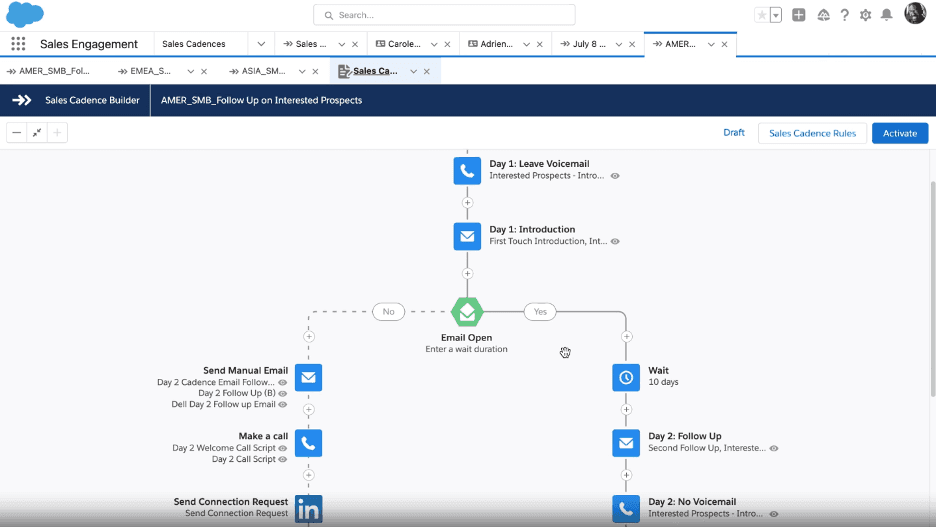
- Customizable cadences: We found the customizable cadences feature especially useful. Cadences allow your team to follow a set path when communicating with leads.
- Premium features: While most features come standard, upgrading to a premium plan enhances your contact management with AI-powered insights, recommendations, and communication transcripts and summaries.

Salesforce
Salesforce edges out Pipedrive for contact management because most of its powerful tools to help you communicate with customers and leads come standard. We appreciate that Pipedrive offers competent email capabilities, but we would have liked to see them available across all plans.
Ease of Use
Pipedrive
Pipedrive’s simple visual interface and straightforward, sales-focused features make it a highly user-friendly platform.
- Visual features: Thanks to the handy templates and drag-and-drop menus, your sales pipelines will be up and running in no time.
- Mobile CRM app: We appreciate that the mobile CRM app lets you work from anywhere.
- Integrations: You can integrate with over 400 external apps so your teams can keep using the tools they love.
- Online resources: Some advanced functions and add-ons are complex, but Pipedrive offers articles, training videos and other online resources to help you navigate the platform.
Salesforce
Salesforce offers a more extensive list of features than most competitors, and you can complete almost any task right from the platform. The learning curve for such a complex solution can be steep, but we think that once you get the hang of things, Salesforce is easier than it seems.
- Tools and integrations: Salesforce has tools for almost every business area and allows thousands of must-have CRM integrations, so you’re guaranteed to have the functionality you need to succeed.
- Mobile app: Salesforce’s excellent mobile app lets you connect from anywhere.
- Einstein AI: We especially love the time-saving benefits of Einstein AI, including automations and content generation.
Still, we were disappointed that many helpful features, like integrations and AI, don’t come standard across all plans.
Pipedrive
Pipedrive beats Salesforce because of its simple, easy-to-navigate visual platform. We think most teams will start selling better right off the bat, thanks to its foolproof features. For businesses that need the advanced functions of a more robust platform, Salesforce is a better option and is relatively easy to use despite its complex feature set.
To ensure a successful CRM implementation, ensure that you’ve researched your platform and that it aligns with your company’s vision. Train your team, test the system, and carefully migrate your data.
Customer Service
Pipedrive
- Online resources: We like that Pipedrive provides extensive online resources, including its Knowledge Base articles; Pipedrive Academy tutorials, courses and webinars; and Pipedrive Community forum. Anyone can learn how to use the platform and solve problems on their own.
- Live support: We were disappointed with Pipedrive’s live support. Most users only have access to 24/7 chat.
- Phone support: For phone support, you must subscribe to a premium plan.
Salesforce
Salesforce offers three support tiers:
- Standard Success: Standard Success is free with all plans and includes online learning tools, a help portal, community forums and online technical support through case submission.
- Premier Success: Premier Success is included free with Unlimited Plans or for 30 percent of your license fees. It has all the features of Standard Success, plus 24/7 phone support, developer support, coaching and onboarding.
- Signature Success: Signature Success includes expanded service, but you must speak to a sales rep for pricing.
We appreciate Salesforce’s online self-help resources and the ability to get a callback when you require additional support. Still, the wait time could be costly. We would have liked to see phone support included with all plans.
Tie
We appreciate that Salesforce and Pipedrive offer excellent online resources to help users navigate the platforms and troubleshoot problems. However, we were disappointed that neither plan includes phone support as a standard feature.
link