

Christopher Jones is a content and creative lead at YouTube. He drives marketing,
media, and creative strategy at the intersection of AI, culture, and business growth.
Cristina Conti leads a team of customer engineers at Google Cloud. She is dedicated to
accelerating customer adoption and implementation of Google’s Applied AI portfolio
across Europe, the Middle East, and Africa.
AI has been the buzzword of the last few years. However, a lot of conversations
have focused on the “what”. Now, this is shifting to the “how” as people want to
understand how AI can help in different areas of their professional and personal
lives.
This shift
from the “what” to the “how”
is also reflected in the questions we receive from clients. Marketers want insights on
the practical applications of AI
and its value in daily work — especially within the creative process.
So let’s go on a journey with a fictional marketer to explore how they use AI in their
day-to-day work — and why human input and strategic oversight remain crucial at every
step. This will illustrate the power of utilising AI tools when creating a campaign
brief, producing creatives, and implementing an effective measurement strategy.
The brief: How to use AI to design a marketing campaign
Imagine you’re Lauren, a marketing manager at a British handbag company. Her goal is to
build a digital marketing campaign for the upcoming summer season to showcase the latest
collection to a millennial audience.
Lauren decides to use Google’s
generative AI tool Gemini
to develop the campaign brief for her creative team. She starts by inputting a
prompt
into Gemini with the essential context, including information about her role and
specifics of the brand she works for. She also provides the marketing objectives for the
campaign, the intended audience, and her budget.
Finally, Lauren shares past campaign briefs and the brand guidelines, which outline
their visual identity, tone of voice, and values. This helps Gemini build a brief that
fits the brand.
Lauren continues the chat conversation after receiving the initial brief. This helps her
get more nuanced insights to develop the ideas further.
For example, she asks for the preferences of the target audience on YouTube, such as
their favourite channels and creators. Lauren also asks about relevant factors not yet
considered and crucial to the campaign. This open-ended prompt allows Gemini to share
possible insights and angles she had not yet considered.
At the end of this conversation, Lauren exports the briefing document with all the
additional context and shares it with her creative team.
Production: How to use AI to enhance creatives
The creative team builds two proposals based on the brief and they work with Lauren to
decide the final concept. They proceed with a campaign set on a Greek island.
The company starts by producing a series of videos to create awareness and consideration
for the new collection in their top markets: the U.K. and Italy. The shoot goes well,
but when an unexpected new business opportunity opens up in France, it becomes necessary
to launch a campaign there sooner than anticipated.
They quickly need to generate content in French, but don’t have time to organise another
shoot. They turn to
Ariel, an AI tool that automatically generates dubbed versions of videos. It can distinguish
between the different voices present — and the moments when each voice is active — to
ensure accurate dubbing.
At a later stage in the campaign, Lauren also receives a request from Spain for an ad
that improves consideration for the collection and boosts sales. This wasn’t in the
original brief, which focused only on brand awareness for the Spanish market.
Lauren decides to use
ViGenAiR, an open-source tool based on advanced AI technology on Google Cloud. It can analyse
video content, break it down into coherent segments, and reassemble them into updated
versions to align with the new campaign goal.
This video shows how ViGenAiR works in practice:
With ViGenAir, Lauren is able to provide the team with new creatives based on the
existing videos. The focus of the creatives has shifted to product; showing the new bags
front-and-centre and describing their features, inviting consumers to purchase.
Production: Taking it one step (or two) further
Once the awareness campaign is activated in all countries, there is a need for
additional, more product-centric assets that maintain the same look and feel.
Lauren has a limited budget and little time available to seize the moment, but she needs
images and videos that have the same look and feel as the content already produced.
To do this, the creative team uses Google Cloud’s
Vertex AI. This platform provides a unified environment to access Google’s generative AI models,
such as
Gemini, image generator
Imagen, and video generator
Veo.
The team develops static content set on the Greek island with
Imagen 3. They provide a text prompt and images of the new handbag collection shot in the
studio. Then they describe the desired setting and add details on the type of treatment.
To create the videos, which will be used on YouTube,
Shorts, and
Connected TV, the team chooses some of the shots developed with Imagen 3 and they use Veo to
animate them. Through a text prompt, they request short videos, adding details of the
treatment and animation methods. They opt for a more realistic style — as opposed to,
for example, a cartoon — to fit the fashion world:
The team then give these videos the final touch with
text-to-music AI model Lyria, choosing a summery background melody:
Measurement: How to use AI to understand the effectiveness of creatives
Building a library of suitable creatives is only the first part of the process. Lauren
also needs to understand how effective they truly are to help her reach her brand
awareness and consideration goals.
She uses the
ABCD Detector, which provides detailed automated reports on how consistent the ads are with the
guidelines for effective creatives on YouTube. It helps Lauren understand what is working best and what can be improved to increase
the impact of the ads.
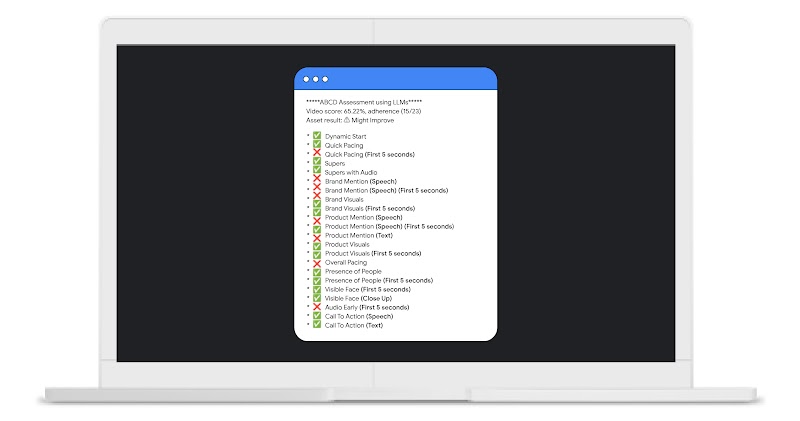
Lauren learns that the brand name is mentioned quite late in the video, yet the ABCD
guidelines show her it’s important to have it early on to help with brand awareness. She
asks the creative team to modify the first 5 seconds of the 15-second video in real-time
to immediately mention the brand name.
Once the campaign has been live for a few months, Lauren uses
YouTube Analytics
for performance metrics, such as impressions and engagements. She also looks at the
“video played to” and audience retention metrics to understand at which point in the
videos most people stopped watching. Lauren compiles all this information into a
detailed report that she will use to define future campaign briefs and content
priorities for video production.
The workflow: How to use AI to facilitate the creative process
Lauren’s journey has shown us how practical applications of AI can help marketing teams
to connect creativity, media, and measurement.
AI can optimise and enhance every phase of the marketing journey. Knowing how to use AI
makes it an indispensable ally for tackling today’s marketing challenges — and seizing
opportunities in a rapidly evolving digital landscape.
link